How to Add MEXC Shortcut to iOS Home Screen

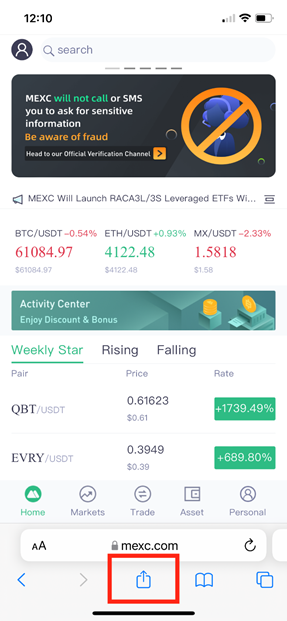
1. Visit m.mexc.com/m.mexc.me on the Safari browser.

2. Click on the “Share” button, and select “Add to Home Screen”.
mceclip0.pngmceclip1.png

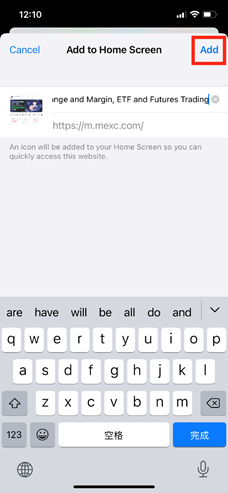
3. Name the MEXC page added to the home screen for convenience.

mceclip2.png

4. Select “Add”

mceclip3.png

5. Find the added page on your Home Screen

mceclip4.png

Select the newly added page on your home screen to visit MEXC!

Coin Icon
Sign up now to receive 10,000 USDT in new user rewards

Subscribe to MEXC Digest

Weekly market moves, listings & insights, straight to your inbox.
By subscribing, you agree to receive MEXC newsletters and email updates, and to our Privacy Policy. The content provided is for informational purposes only and does not constitute investment advice.

Join MEXC on Telegram

Get the latest listings, events, and updates in real time, straight from our official Telegram channel.

How to Add MEXC Shortcut to iOS Home Screen

1. Visit m.mexc.com/m.mexc.me on the Safari browser.

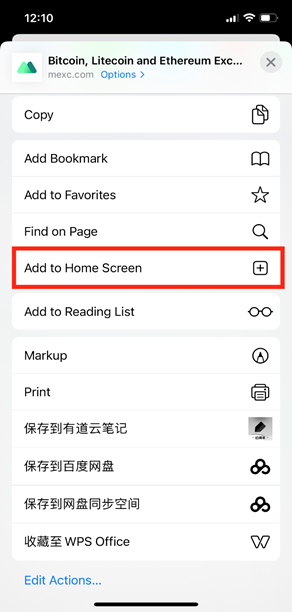
2. Click on the “Share” button, and select “Add to Home Screen”.
mceclip0.pngmceclip1.png

3. Name the MEXC page added to the home screen for convenience.

mceclip2.png

4. Select “Add”

mceclip3.png

5. Find the added page on your Home Screen

mceclip4.png

Select the newly added page on your home screen to visit MEXC!

Coin Icon
Sign up now to receive 10,000 USDT in new user rewards

Subscribe to MEXC Digest

Weekly market moves, listings & insights, straight to your inbox.
By subscribing, you agree to receive MEXC newsletters and email updates, and to our Privacy Policy. The content provided is for informational purposes only and does not constitute investment advice.

Join MEXC on Telegram

Get the latest listings, events, and updates in real time, straight from our official Telegram channel.
mc_announcements_homepage_description_tdkmc_announcements_homepage_description_tdk