

How to Check Address and Memo
1. What is a Memo/Tag?
A Memo/Tag is a numeric or alphanumeric identifier used in cryptocurrency transactions. Its core function is to uniquely identify the recipient or to precisely allocate the transaction to a specific user account within an exchange or platform.
Certain blockchain networks (such as XRP, ATOM, XLM, BTS, etc.) require a memo to be included for on-chain transfers to ensure funds are credited accurately.
2. How to View the Address and Memo/tag
To view the details, visit the MEXC official website and navigate to Deposit → On-Chain Depositand select the relevant token (e.g., XRP).
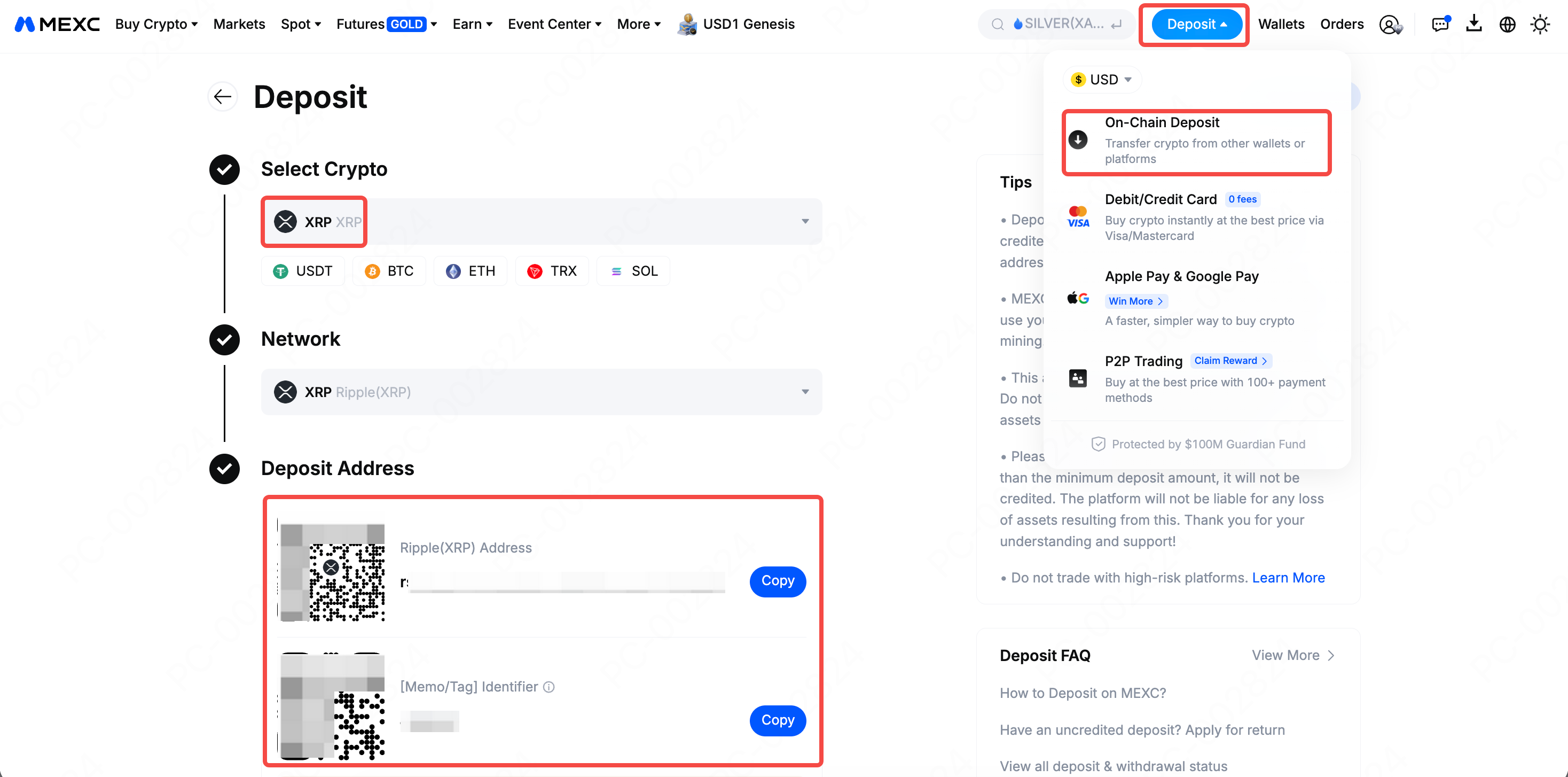
On the app, go to Deposit → On-Chain Deposit from the home screen. Select the relevant token (e.g., XRP) to view the details.
3. How to Fill in the Address and Memo/tag
On the MEXC official website, navigate to Wallets and select Withdraw, then choose your token (e.g., XRP) to enter the withdrawal address and its corresponding memo/tag.
For the mobile app, go to the Wallets page and tap Withdraw, select your token (e.g., XRP) and choose On-chain Withdrawal to input the address and memo/tag.
4. Key Considerations for Memos/Tags
1) One-to-One Correspondence: The Memo corresponds uniquely to the deposit/withdrawal address to ensure the destination is specific. Entering an incorrect memo or failing to include it may result in the permanent loss of your assets.
2) Network Consistency: When selecting a deposit network, the withdrawal network on the external platform or wallet must match the deposit network on MEXC. Inconsistency between networks will result in the loss of your assets.
3) Not Always Required: Not all tokens or networks require a memo or tag. Please proceed according to the specific requirements of the asset you are depositing or withdrawing.
5. Handling Exceptions
5.1 Failure to deposit due to missing or incorrect Memo/Tag
Issue Description: The transfer failed to reflect in your account because the required Memo/Tag was either omitted or entered incorrectly.
Solution: To resolve this, please visit the MEXC official website and file a Uncredited Crypto Deposit. The platform will process your review within 1-2 business days, and you will receive the status update via email or an internal notification.
Related Reading: How to Fill Out the Uncredited Deposit Return Application Form
5.2 Missing or incorrect memo/tag during withdrawal
If you realize that you missed the Memo or entered the wrong one before confirming the withdrawal via SMS or email, you can simply go to Withdrawal History, click Cancel on that specific transaction, and then re-initiate the withdrawal with the correct details.
On the MEXC Official Website, go to Wallets in the top navigation bar, select Transaction History, and then find the record in Withdrawal History to cancel it. On the MEXC App homepage, tap your profile avatar at the top, select Order History, then go to Deposit/Withdrawal and find the record in Withdrawal History to cancel it.
However, if you discover the error after you have already received the confirmation email or SMS, the transaction cannot be cancelled. In this case, please copy the TxID of the withdrawal and contact the support team of the receiving platform (the destination wallet or exchange) to ask for assistance in recovering your assets.
Related Reading: How to Find TxIDs on MEXC