

How to Apply for the MEXC Global Card: A Complete Beginner's Guide
1. What Is the MEXC Global Card?
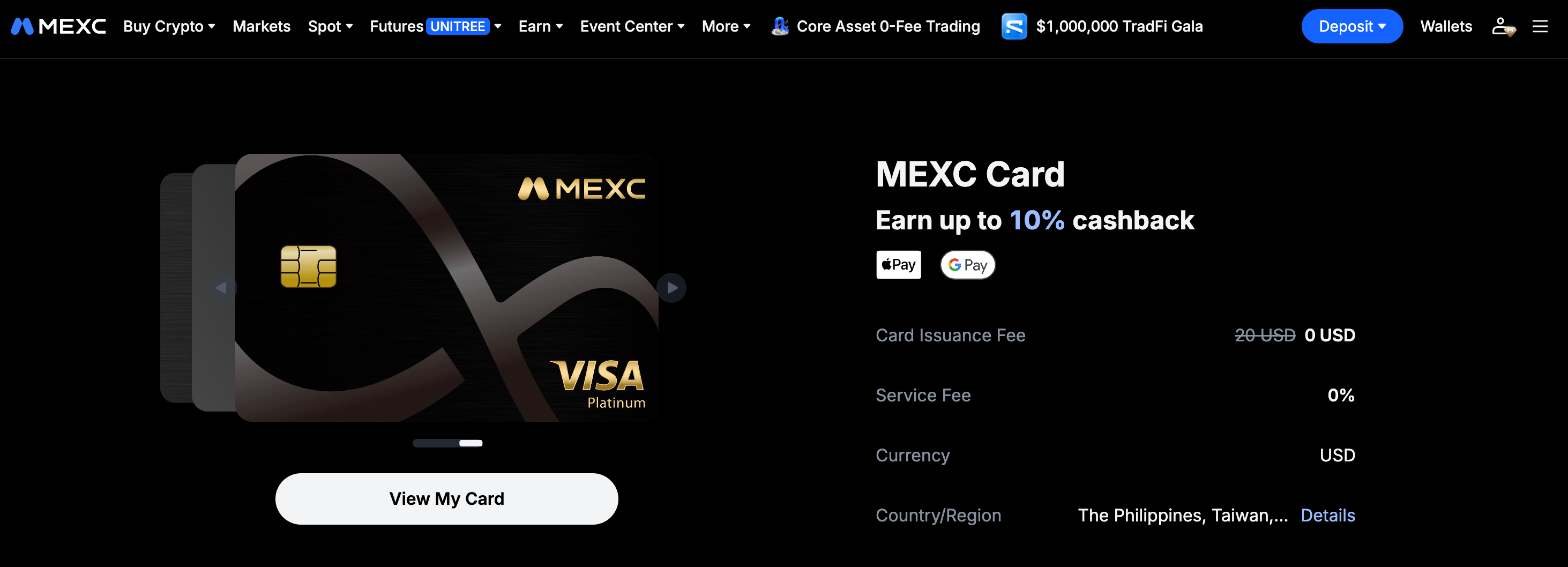
The MEXC Global Card is a crypto payment card offered by MEXC to users worldwide. It is currently available in multiple countries and regions, including the Philippines, Taiwan, and Vietnam. Once your application is approved and the card is activated, you can use your card balance for everyday purchases, including shopping, dining, and travel.
In addition to everyday payments, the MEXC Global Card offers the following benefits:
- Up to 10% cashback: Earn cashback on eligible spending and turn everyday spending into ongoing rewards.
- Limited-time card issuance fee waiver: The standard USD 20 card issuance fee is currently waived.
- Exclusive Earn program: Participate in the MEXC Global Card exclusive Earn program and receive a 7% APR by staking funds, with flexible redemption and immediate access to your assets.
- Referral rewards: Invite friends to sign up and activate a card, and both parties can receive rewards.
2. Requirements for Applying for the MEXC Global Card
Before applying, make sure that you have signed up for an MEXC account and completed Advanced KYC. Advanced KYC is required to apply for the MEXC Global Card.
If you have not completed verification, follow the on-screen instructions to submit the required identity documents for review.
3. How to Apply for the MEXC Global Card
The application process is the same on the MEXC website and App. The steps below use the website as an example.
Step 1: Go to the MEXC Card Page
Web: Log in to the MEXC website. Select MEXC Card under Buy Crypto in the top navigation bar.
App: From the MEXC App homepage, tap More, then select MEXC Card under Finance.
Step 2: Find the MEXC Global Card and Apply
Locate the MEXC Global Card on the card page and click Apply Now to begin the online application.
Step 3: If Applicable: Fund and Activate the Card
Depending on the card product, you may need to make an initial deposit before activating the card. Any amount deposited will be added to your card balance and can be used for purchases.
If your application is unsuccessful, the full amount will be automatically returned to your account.
You can obtain USDT in the following ways:
- If you already hold USDT, transfer it directly to your Fiat account.
- If you do not hold USDT, purchase it through Quick Buy, P2P, or deposit it from an external wallet.
Step 4: Submit Your Personal Information
Follow the on-screen instructions to enter and submit the required personal information, including your contact details, identity document information, and residential address.
Make sure that all information is accurate to avoid delays in the review process.
Step 5: Complete the Review and Activate Your Card
The review is usually completed within a few minutes after submission. Once your application is approved, a confirmation email will be sent to your registered email address, and your card will be ready to use.
Step 6: Fund Your MEXC Global Card
On the My MEXC Card page, click Deposit to fund the card from your Fiat account.
You can transfer USDT from your Spot Account, purchase USDT through Quick Buy or P2P, or deposit USDT from an external wallet. Deposits usually arrive within a few minutes. You can view all previous deposits under Transactions.
Step 7: Add Your Card to Apple Pay or Google Pay
You can add the MEXC Global Card to Apple Pay and Google Pay.
Go to your MEXC Card list and select the card to view its details. Manually enter the card information in your mobile wallet and complete the verification process. Make sure that the name used in your mobile wallet matches the cardholder name.
Once the card has been added, you can use it for convenient payments worldwide.
How to add the card to Apple Pay:
- Open the Wallet app and tap +
- Select Debit or Credit Card
- Select Add a Different Card
- Select Scan or Add Card
- Tap Enter Card Details Manually
- Enter the required information and complete the setup
How to add the card to Google Pay:
- Open the Google Wallet App and tap Add to Wallet
- Select Payment Card
- Enter the card information manually
- Complete the verification
Once the card has been added, you can start using it immediately.
4. MEXC Global Card Cashback Rules
The MEXC Global Card cashback rate is determined by your membership tier and calculated based on your monthly spending. Cashback rates range from 4% to 10%:
Tier | M-Score | Cashback Rate | Monthly Cashback Limit |
Standard | 350–599 | 4% | 100 USDT |
Premium | 600–799 | 6% | 300 USDT |
Elite | 800 or above | 10% | 800 USDT |
Your cashback rate for each month is determined by your membership tier on the final calendar day of that month. Cashback rewards will be distributed by the 15th day of the following month.
Refunded or reversed transactions do not count toward the qualifying spending requirement. Any cashback already credited for these transactions will be deducted.
5. MEXC Global Card FAQ
5.1 How do I apply for the MEXC Global Card?
Log in to your MEXC account and complete Advanced KYC Verification. Go to the MEXC Card page, click Apply Now, submit the required information, and complete any required deposit and activation steps.
Generally, each verified identity may apply for only one card.
5.2 How does MEXC Global Card cashback work?
Your cashback rate is determined by your M-Score and ranges from 4% to 10%. Cashback is calculated based on monthly spending and distributed by the 15th day of the following month.
Refunded transactions are not eligible for cashback. Any cashback already credited for a refunded transaction will be deducted.
5.3 Do refunds affect my cashback amount and tier?
Yes. Refunded or reversed transactions do not count toward the qualifying spending requirement. Any cashback already credited for these transactions will be deducted.
5.4 How do I fund my MEXC Global Card?
On the My MEXC Card page, click Deposit to fund your card from your Fiat account. Deposits usually arrive within one minute.
You can transfer USDT from your Spot account, purchase USDT through MEXC Quick Buy or P2P Trading, or transfer USDT from an external wallet.
5.5 Is there a card issuance fee for the MEXC Global Card?
The card issuance fee is currently waived for a limited time. Please refer to the fee displayed on the application page for the latest information.
5.6 How do I add the MEXC Global Card to my mobile wallet?
Go to your MEXC Card list and select the card to view its details. Enter the card information in Apple Wallet or Google Wallet and complete the verification process. You can then use your phone for contactless payments.
5.7 What should I do if my card is lost, damaged, or stolen?
Go to the My MEXC Card page, select More, and click Freeze Your Card immediately. Then contact MEXC Customer Service to request a replacement card and protect your funds.
5.8 How do MEXC Global Card referral rewards work?
Invite a friend to sign up and activate a card. The referrer can receive 20 USDT for each eligible referral, while the referred user can receive 10 USDT.
The referred user must be newly signed up, make a net deposit of at least 100 USDT within seven days of their first deposit, maintain the required amount for at least 24 hours, and successfully activate the card.
Referral rewards are available for a limited time and may be adjusted.